Search This Blog

Friday, February 16, 2024

article logoYour Complete Umrah Guide: A Spiritual Journey

Embarking on the sacred pilgrimage of Umrah is a deeply enriching experience for Muslims worldwide. It's a journey of faith, devotion, and self-discovery. To ensure a smooth and fulfilling Umrah experience, here's a comprehensive guide:

Preparing for Umrah:

1. Educate Yourself: Familiarize yourself with the rituals and significance of Umrah. Seek guidance from knowledgeable sources or scholars to understand the spiritual dimensions.

2. Plan Ahead: Arrange your travel and accommodation well in advance to avoid last-minute hassles. Consider factors like proximity to the holy sites and quality of services.

3. Documentation: Ensure you have all the necessary documents, including a valid passport, visa, and health certificates, as per the requirements of the Saudi authorities.

4. Physical Preparation: Engage in physical activities and exercises to build stamina for the rigorous rituals involved in Umrah. It's essential to be in good health to fully participate.


During Umrah:

1. State of Ihram: Enter the state of Ihram, the sacred state of purity, at the designated miqat (boundary point). Adhere strictly to the rules of Ihram, including dress code and conduct.

2. Tawaf: Perform Tawaf, the circumambulation around the Kaaba, with utmost reverence and devotion. Reflect on the significance of each circuit and supplicate earnestly.

3. Sa'i: Complete Sa'i, the brisk walk between the hills of Safa and Marwah, symbolizing Hagar's search for water. Recite prayers and contemplate on the trials of Prophet Ibrahim's family.

4. Prayers and Reflection: Dedicate time for prayers, Quran recitation, and reflection throughout your journey. Utilize quiet moments to connect with your Creator and seek forgiveness.

5. Visit Prophet's Mosque: If possible, visit the Prophet's Mosque in Medina to pay respects to Prophet Muhammad (peace be upon him) and absorb the tranquility of the sacred city.


Post-Umrah:

1. Gratitude and Reflection: Express gratitude for the opportunity to perform Umrah and reflect on the spiritual insights gained during the journey. Share experiences with fellow pilgrims to deepen understanding.

2. Continued Devotion: Carry forward the spiritual momentum gained from Umrah into your daily life. Maintain regular prayers, acts of charity, and righteous deeds to sustain the spiritual growth.

3. Community Engagement: Share your Umrah experience with your community and encourage others to embark on their spiritual journey. Offer support and guidance to aspiring pilgrims.

4. Prayer for Return: Pray for the opportunity to return to the sacred precincts of Mecca and Medina for Umrah or Hajj in the future. Keep the intention alive and strive to fulfill this blessed obligation again.

Embarking on the journey of Umrah is a profound manifestation of faith and devotion. May your Umrah pilgrimage be a transformative experience, enriching your spiritual journey and drawing you closer to the Divine presence.
Saturday, April 1, 2023

article logoIPL LIVE 2023: Punjab vs Kolkata Match#2

IPL Live 1st april 2023 PBKS vs KKR
.....LOADING......

Looooodddiiiinnnnnggggg......

Posted by Admin on Saturday, April 1, 2023

Friday, July 10, 2020

article logoUsing data entry form in excel without VBA

Thursday, June 18, 2020

article logoHow to create worksheet index in Excel with VBA

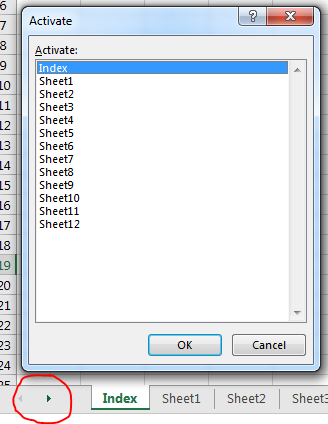
The title above I think describing everything, even though I would like to explain the title briefly. Like you have a Workbook in excel containing 20+ or more sheets and its very annoying to navigate from one sheet to another by scrolling the scroll bar. There are many ways to do the navigation. By right-clicking on the lower-left corner (shown in the picture in red circle) of the sheets navigation panel, you can activate the navigation box and you can scroll to your desire sheet to navigate.


But today my topic is to do it in VBA and to create a list of all sheets in one index sheet and all available sheets will have the link to return in the index sheet.

Saturday, May 23, 2020

article logoPIA Plane Crash on 22 May 2020

A Pakistan International Airlines (PIA) plane traveling from Lahore to Karachi has crashed close to Karachi airport. All but two of the 99 people on board were killed, according to the Health Ministry

Friday, May 8, 2020

article logoLeila Gharani, is an Excel Microsoft MVP

Leila Gharani, is an Excel Microsoft MVP, has explain all the excel problems and solve them very easiest way. Conception and presentation is highly appreciated. I am a big fan of her. Most of my excel knowledge I am getting from her Youtube channel and thorough her Website. 

Have look on her youtube channel and website. You will love it. guaranteed.

Tuesday, April 16, 2019

article logoICC Cricket WorldCup 2019

Download this amazing cricket score sheet which has created on Microsoft Excell. Update each and every match score, over, wicket and keep your team updation on track with you. It will work automatically. It will show your Time zone time on scheduled date and time. No need to change anything.

Here is a Sample look :
After Download the main Excel File, Open it and enable macro to work the worksheet properly.


Download Link>>


Monday, September 10, 2012

article logoHow to partition a drive without loosing data

Partitioning a hard drive without loosing data can be done by right clicking on the mouse. Personally I made it in Windows 7, and aslo try in Vista, both are successful. But I don't know its possible or not in Windows XP. Hopefully it will be possible in XP also.

For doing this action you need to login as administrator in your computer. Then go to Start menu and right click on your "My computer" and select MANAGE.

Computer Management Dialogue will come. From this box select 'Disc management' under Storage, indicated by red arrow in the picture.

Monday, November 14, 2011

article logoCreate your fan page on Google+


Google+ fan page is like as Facebook fan page. Google plus gives you this opportunity to create a fan page for your web site, product, hotel, restaurant, local business, products or brands, company, music or TV.
You can create a Fan page for your customer, follower or fans for hangout to your branding.
Click Here for creating a Google+ page 

Tuesday, October 25, 2011

article logoWrite Protect your USB Device without any software


Now protect your USB device or other USB device for transferring file from your computer. For security reason I am sharing this to you. This tricks able to help you and nobody does not transfer any file from your PC to any kind of Storage device. So, I hope that it’s must be help you.


Follow the below steps for Enable write protect:
  • Go to your Run option and write “regedit”
  • Now click “Ctrl+F” for find
  • Written the Find box “Storagedevicepolicies” and press Enter
  • Now Click the Write Protect option from the Right side and click to Modify it.
  • Change the Value data 0 to 1
You are done. If you don’t wanna to do this things then just cope the below code and paste it to your Notepad and save it to “writeenable.reg” this names. Then just double click it.

Monday, October 24, 2011

article logoSolve Windows XP Restart Problems

The root of a Windows XP shutdown problem can be traced to several issues. Windows as an operating system has been stable at best but is known to have many problems within its shell. One of the possible problems that can occur is a damaged exit sound file. If your Windows was recently installed or there was a problem in the install process, then there might be a hiccup in the shutdown process.

Some technicians actually have identified the problem as starting from either a problem with hardware devices or the problem with a recent hardware install. When you try to troubleshoot the problem of Windows shutdown, make sure you have initial fail safes that Windows has installed turned off. A good way to troubleshoot this problem would be to log onto Windows in ‘safe’ mode and see if there are any hardware device driver conflicts that you can resolve. Sometimes, bad command lines or orphan keys in the registry can cause Windows to lock and restart itself, or even hang. So you see, resolving a windows XP shutdown problem is not at all that difficult. If you have a basic understanding on how to use your computer and how it operates, you should be able to resolve a Windows XP shutdown problem without having to engage the services of a professional computer technician.

Monday, September 5, 2011

article logoHow to add animated tag cloud for blogger blog

"Blogumus" is an Flash based tag cloud widget which uses scripts converted from Roy Tanck's WP Cumulus plugin for Wordpress. Amanda from blogger buster convert this for use in Blogger powered blogs. The result is the widget you can see in action at the top of this post. However your mouse over the Flash object to see the animation begin. In this post, I'll explain how you can add Blogumus to your own Blogger layout with ease!
This widget uses a combination of JavaScript and Flash animation to parse and display your blog labels. Once installed in your template, it should work "out of the box" without any additional tweaking required, though of course you may prefer to change the variables for color, background and size if appropriate :) You should also be able to move the Label Cloud widget through the Page Elements page of your dashboard if you prefer display in a different layout location. To see Blogumus in action, both Flash and Javascript must be installed and enabled for your internet browser. However, it does degrade relatively gracefully, and label links will still be clickable (though not animated) for those who do not use JavaScript of Flash (including search engine spiders).

Friday, May 6, 2011

article logoHow to add scroll Message on Blogger Title Bar

Adding Scrolling Message on Blog Title & Browser Title bar are simple an easy steps.
First log in your account. Go to Design>>Edit HTML
Now Find this code below :
<b:skin><![CDATA[/*
Above/befor this code Paste the below code:

<script type='text/javascript'>
//<![CDATA[
msg = "Your Message goes here";
msg = " ....." + msg;pos = 0;
function scrollMSG() {
document.title = msg.substring(pos, msg.length) + msg.substring(0, pos); pos++;
if (pos > msg.length) pos = 0
window.setTimeout("scrollMSG()",200);
}
scrollMSG();
//]]>
<script> 
Put your Message on "Your Message goes here" & Enjoy! the scrolling on taskbar & titlebar.

Thursday, May 5, 2011

article logoSSC Examination 2011 Results will be publishe on 10th May

SSC examination 2011 Results under Bangladesh Education board will be published on 10 May, 2011 at around 12 PM (Bangladesh Time). As declare of Education Board Bangladesh the SSC 2011 results will be available on their websites.

Education Board Banner

Bangladesh Education Board already gets full preparation to publishe this results. The information of S.S.C and Dakhil result 2011 in Online of Dhaka, Rajshahi, Chittagong, Comilla, Barisal, Jessore, Dinajpur, Sylhet, Madrasah and Technical board will be published in a days. Ministry of Education, Government of Bangladesh will conform that they will be published this SSC result 2011 around 8, 9 and 10 May, 2011.

Sunday, May 1, 2011

article logoSpeed up your Windows XP that never happen before-2

OPTIMISE YOUR PAGEFILE
If you give your pagefile a fixed size it saves the operating system from needing to resize the page file.
1. Right click on My Computer and select Properties
2. Select the Advanced tab
3. Under Performance choose the Settings button
4. Select the Advanced tab again and under Virtual Memory select Change
5. Highlight the drive containing your page file and make the initial Size of the file the same as the Maximum Size of the file.
Windows XP sizes the page file to about 1.5X the amount of actual physical memory by default. While this is good for systems with smaller amounts of memory (under 512MB) it is unlikely that a typical XP desktop system will ever need 1.5 X 512MB or more of virtual memory. If you have less than 512MB of memory, leave the page file at its default size. If you have 512MB or more, change the ratio to 1:1 page file size to physical memory size.


REMOVE THE DESKTOP PICTURE
Your desktop background consumes a fair amount of memory and can slow the loading time of your system. Removing it will improve performance.
1. Right click on Desktop and select Properties
2. Select the Desktop tab
3. In the Background window select None
4. Click Ok

REMOVE FONTS FOR SPEED
Fonts, especially TrueType fonts, use quite a bit of system resources. For optimal performance, trim your fonts down to just those that you need to use on a daily basis and fonts that applications may require.
1. Open Control Panel
2. Open Fonts folder
3. Move fonts you don’t need to a temporary directory (e.g. C:\FONTBKUP?) just in case you need or want to bring a few of them back. The more fonts you uninstall, the more system resources you will gain.

Wednesday, April 27, 2011

article logoSpeed up your Windows XP that never happen before

Pursue Some tricks we can make our Windows more faster that never happen before and usually these all are unnecessary for each time. Some features are usually for only looking attractive.
Optimizing Display Settings
Windows XP mostly like for its visual interface. We do not interfere that but on this visualization has more extra feature that does not need ever without wasting system resource. Lets see how we can disable it-
1. Go to Start Menu
2. Click Setting.
3. Click Control Panel
4. Click System.
5. Go Advance Tab
6. Click Setting under Performance group
7. Off only the following ticked
 * Show Shadows under Menu
 * Show Shadows under Mouse Pointer.
 * Show Translucent Selection Rectangle
 * Use drop shadows for icons labels on desktop.
 * Use visual style on windows and buttons

Saturday, April 23, 2011

article logoHow to add feedburner Email subcription on blogger

You might have seen lots of blogs are using email subscription option to their readers. It can happen that your friend using feedburner email subscription widget to his/her blog, and you are looking for a help to add email subscription option to your blog.
 Here you will find about adding an email subscription widget to your blog from feed burner. These are easy steps to follow:
  • First of all and before anything, you'll need a FeedBurner account. To create an account, just click here. If you have already google account, that case it will be easier for you. Otherwise you can use other email address to open an account from FeedBurner.
  • If you are a new FeedBurner user, you'll need to burn your feed first. 

Saturday, April 9, 2011

article logoHow to Install Windows XP More Faster

This is a simple tricks to Installing Windows XP in 10-15 Minutes. It will very helpful those who frequently install windows XP. Generally we see that XP Installation takes more than 39 Minutes and its' goes absolutely true when your computer RAMs are minimum. These simple steps are for those type of user who watns to reduce the OS XP Installation time.
Now I'll teach you these simple steps :
1. Insert an XP Bootable CD/DVD on your ROM
2. Reboot your system. It's will automatic ask to boot from CD/DVD ROM. Press any key.
3. Format your destination drive and setup will automatically loaded all necessary file.
4. As soon as the 256 Color part is complete and gone away you will enter the Graphical User Interface (GUI) area as like as below screen.

Wednesday, February 2, 2011

article logoHow to Remove Windows Genuine Advantage WGA

Windows Genuine Advantage is a software anti-piracy program started by Microsoft in 2005. It enforces the online validation of some of the Microsoft products. It is automatically installed if Windows Automatic Updates are enabled. If goes to the Windows Update site, it will ask you for installing this validation tool before you can select the updates from the Microsoft update website. By accepting to install this validation tool, anActiveX component in Internet Explorer is installed.

If, for some reason, this tool fails to validate your Windows, then it’ll always show you a warning that you may be a victim of software counterfeiting and that your Windows is not genuine. It will show up on your logon screen and make you wait for some seconds. And when you logon, it will just site in your status bar and will keep annoying you.
To Remove this tools from logon screen and also status bar Its need to Validate your windows or other hand Re-installing the Windows.

Saturday, January 29, 2011

article logoRegistry Editor has been disable by Administrator


Some time we need to edit our system registry, but computer says on an error message "Registry editing has been disabled by your administrator." There is a simple way to enable it unless that PC is using Group Policy Editor.To do that follow these steps:

Click Start, Click Run and type gpedit.msc then press ENTER.